Table of contents
By-Research Team
February 20, 2026 | 11 min read | DPDP
Data Inventory: Your First Compliance Step
No documentation. Operational risk.
Most organizations believe they “manage” personal data. In reality, they manage assumptions.
A Data Inventory eliminates those assumptions by becoming the single source of truth for what personal data exists, where it lives, why it is used, and how long it is retained.
Under the Digital Personal Data Protection Act, 2023 (DPDP Act), Data Fiduciaries — think of them as bank managers for personal information — must demonstrate accountable processing and security safeguards. That demonstration begins with visibility.
Build the blueprint first. Everything else depends on it.
What Is a Data Inventory?
A Data Inventory is a structured record of all personal data your organization processes. It documents what personal data exists, where it is stored, why it is collected, who accesses it, and how long it is retained. It forms the foundation for DPDP compliance, ROPA documentation, and risk-based safeguards.
Simple definition. Serious implications.
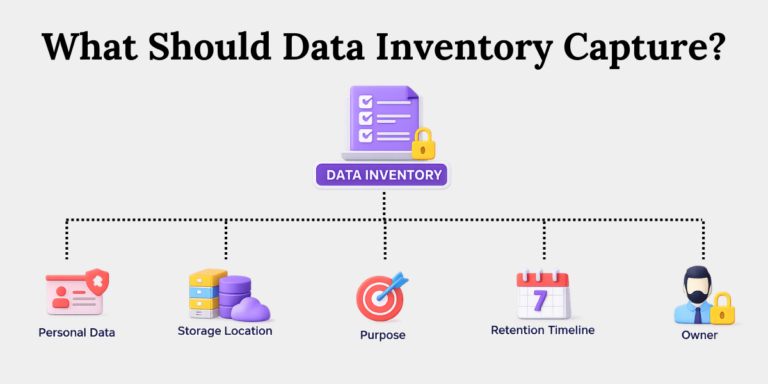
A defensible Data Inventory captures:
- What personal data the organization holds.
- Where that data is stored (system, file, vendor).
- Why it is collected and used (purpose).
- How long it is retained (retention timeline).
- Who owns or controls it (department or data owner).
Without this, compliance becomes narrative — not evidence.
Why Does Data Inventory Matter Under DPDP?
Data Inventory operationalizes DPDP principles like purpose limitation, accountability, retention discipline, and security safeguards. Without documented visibility into personal data, organizations cannot enforce consent integrity, manage vendor exposure, or respond accurately to breach notifications.
The DPDP Act emphasizes:
1. Purpose-bound processing
Under DPDP, personal data can only be used for the specific purpose it was collected for.
A Data Inventory helps you clearly record that purpose — for example, salary processing data cannot suddenly be reused for marketing. Without this documentation, cross-purpose misuse becomes easy and risky.
2. Security safeguards
DPDP requires organizations to implement reasonable security safeguards.
Your Data Inventory tells you exactly where personal data is stored — CRM, HRMS, shared drives — so you know where encryption, access control, and logging must be applied. You cannot protect what you cannot locate.
3.Timely breach notification
DPDP mandates notifying affected individuals without delay and informing the Data Protection Board within 72 hours.
A Data Inventory allows you to quickly identify which system was affected, what type of data was exposed, and which individuals must be notified. Without it, breach response turns chaotic.
4. Special protection for children’s data
DPDP places stricter conditions on processing children’s data, including consent and restrictions on tracking.
Your Data Inventory should clearly flag systems handling children’s data — for example, school admission portals or student learning apps — so enhanced controls can be applied proactively.
Each requirement depends on knowing where personal data resides.
Ask yourself:
- Can you immediately identify all systems storing children’s data?
- Can you list all vendors processing financial identifiers?
- Can you prove why a specific dataset still exists?
If the answer requires “checking with IT,” your inventory is incomplete.
What Does a Minimum Viable Data Inventory Include?
A minimum viable Data Inventory should document data types, source of collection, processing purpose, storage location, data owner, retention period, and security safeguards. Regulators assess completeness, not format. Even a shared spreadsheet can work — if it is structured, validated, and updated.
Start with essentials. Expand with maturity.
At minimum, document:
1. Identify data types
Clearly list what kind of data you are collecting — name, email, Aadhaar number, health records, financial details, children’s data.
For example, HR may store PAN and bank details, while marketing stores email and phone numbers. Categorizing this helps apply the right level of protection.
2. Record source of collection
Document where the data comes from — website form, mobile app, job application portal, vendor submission, offline form.
If someone asks, “How did you get my data?”, your inventory should provide the answer immediately.
3. Define purpose of processing
Write down why the data is collected — payroll processing, KYC verification, delivery fulfilment, analytics, marketing campaigns.
For example, customer address collected for delivery should not be reused for unrelated profiling.
4. Specify storage location
Note exactly where the data lives — CRM system, HR software, cloud storage, shared drive, SaaS platform.
If your CRM is cloud-based and your HR files are on a local server, both must be recorded clearly.
5. Assign data owner or department
Every dataset needs a responsible team — HR for employee data, Marketing for campaign data, Finance for vendor records.
When regulators ask questions, someone must answer. Silence during audits signals poor governance.
6. Document retention timeline
Define how long data is kept — 7 years for financial records, 3 years for inactive customers, or as required by law.
Keeping everything “just in case” increases legal and security risk.
7. List vendors with access
Identify third parties accessing your data — payment gateways, payroll processors, logistics partners, analytics tools.
If your payment gateway processes customer card data, that exposure must be documented.
8. Describe safeguards
Mention how data is protected — password protection, role-based access control, encryption, backup protocols.
For example, HR data should not be accessible to the marketing team.
Do not overcomplicate the start. Structure first. Automate later.
How to Build a Data Inventory?
Build your Data Inventory through cross-functional discovery, structured classification, validation with business owners, and continuous update discipline. Avoid IT-only exercises. Anchor it in operational ownership and governance workflows to ensure it evolves with systems, vendors, and regulatory changes.
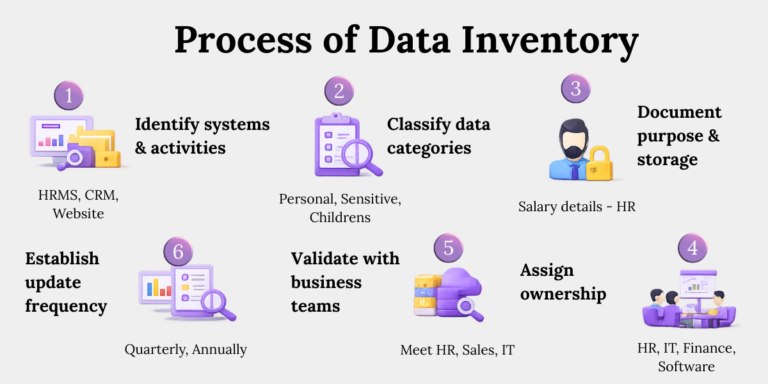
Follow this blueprint.
Step 1: Identify Systems and Activities
Start by listing all systems storing personal data — HRMS, CRM, website database, accounting software.
Then link each to a business activity. For example, the CRM supports customer onboarding and support. Systems store data, but activities justify it under DPDP.
Step 2: Classify Data Categories
Distinguish between personal, sensitive, and children’s data. Under DPDP, children’s data attracts stricter obligations.
For instance, email addresses are personal data, health records are sensitive, and student records fall under children’s data. Misclassification often leads to weaker controls than required under DPDP.
Step 3: Document Purpose and Storage
Tie each dataset to a clear business purpose. Record its exact storage location.
For example, employee bank details are stored in HRMS for salary processing. If you cannot link purpose and storage clearly, your compliance defence weakens.
Step 4: Assign Ownership
Appoint a responsible department or data steward.
If HR handles employee data, they should review and update that section of the inventory. This prevents confusion when audits or breach investigations occur.
Step 5: Validate With Business Teams
Meet teams across departments and verify the documentation.
Marketing may be using an email automation tool that IT is unaware of. These hidden tools often surface during validation discussions.
Step 6: Establish Update Frequency
Review the inventory quarterly at minimum.
If a new SaaS HR tool is introduced or a new mobile app is launched, update the inventory immediately. An outdated inventory is misleading and risky.
What Does Data Inventory Look Like in Practice?
In practice, a Data Inventory may begin as a structured spreadsheet or shared compliance tracker. Mature organizations integrate it into automated data discovery tools and governance workflows. The format matters less than accuracy, ownership, and update discipline.
Start simple. Scale intelligently.
A functional inventory:
- Is maintained in a controlled spreadsheet or governance tool.
- Is updated during system or vendor onboarding.
- Is referenced during breach simulations.
- Is used to validate retention enforcement.
Is Data Inventory a One-Time Exercise?
No. Data Inventory is a living control mechanism that must evolve with new systems, vendors, products, and regulatory updates. Static documentation quickly becomes inaccurate, exposing the organization to retention violations and incomplete breach reporting.
“We did it once” is not compliance.
Systems evolve. Vendors change. Regulations update.
Common triggers requiring updates:
- Launch of new digital products: If you launch a new mobile app collecting location data, your inventory must reflect that new data category immediately.
- Integration of SaaS tools: When marketing adopts a new CRM or analytics tool, personal data exposure increases. This change must be documented.
- Cross-border data transfers: If customer data starts being stored on servers outside India, that transfer must be recorded and assessed.
- Regulatory amendments: If DPDP Rules introduce new obligations for children’s data or retention, your inventory must align with updated requirements.
- Organizational restructuring: If departments merge or responsibilities shift, data ownership changes. The inventory must reflect who is accountable now.
If your inventory does not change when your systems change, it is not a control — it is a relic.
What Are the Challenges in Data Inventory?
The most common Data Inventory challenges include data spread across legacy systems, unclear ownership across departments, manual tracking errors, vendor opacity, and operational resistance. These challenges are predictable — and fixable with governance design and leadership alignment.
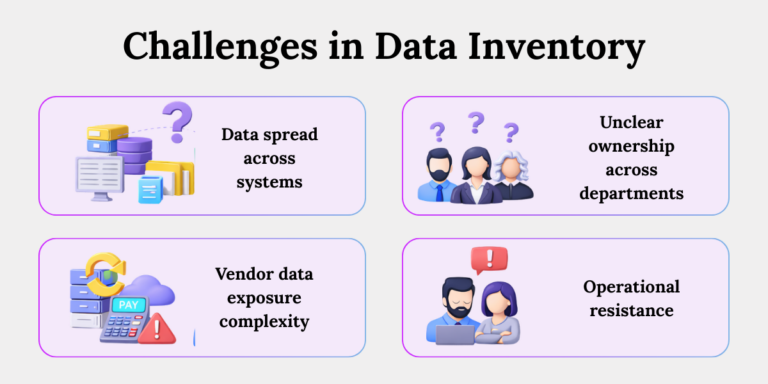
Most organizations struggle with:
1. Data Spread Across Siloed Systems
Personal data often sits in CRM, HRMS, Excel files, shared drives, and email inboxes. Mapping everything feels overwhelming, so teams delay it.
2. Unclear ownership across departments.
Marketing collects customer data, IT manages systems, Legal drafts policies — but no one owns the inventory. This diffusion creates gaps.
3. Vendor data exposure complexity
Organizations use multiple vendors — payroll, payment gateways, cloud storage. Tracking who accesses what becomes complicated without structured documentation.
4. System changes without updates
IT upgrades systems, but compliance records remain unchanged. Over time, the documented inventory stops matching reality.
5. Operational resistance
Teams may see inventory exercises as extra paperwork. They do not immediately see the compliance value, leading to half-completed documentation
Teams often perceive inventory work as administrative burden.
Inventory is not paperwork. It is risk visibility.
Practical Exercise: Start Small. Start Now.
Begin your Data Inventory journey by selecting three critical systems and documenting what personal data they hold, why they hold it, and how long they retain it. This focused exercise builds immediate visibility and momentum without overwhelming the organization.
Avoid paralysis. Start controlled.
Try this:
1. List three critical systems
For example, HRMS, CRM, website database. Begin small. Do not attempt enterprise-wide coverage on day one.
2. Identify personal data categories stored
Check what each system holds.
HRMS may contain bank details and PAN numbers. CRM may contain email addresses and phone numbers. Website database may store login credentials.
3. Define processing purpose
Ask: Why does this data exist?
HRMS data exists for salary processing. CRM data supports sales and customer support. Website data enables account access.
4. Document retention timeline
Decide how long data should remain.
Inactive CRM records may be deleted after 3 years. Employee records may follow statutory retention rules.
5. Assign a responsible owner
HR updates HRMS entries. Sales updates CRM entries. IT oversees website database security.
Ownership ensures someone is accountable for keeping the inventory accurate.
When teams actually start with these five steps, they often realize how much undocumented data exists. That awareness alone improves compliance posture.
Conclusion
Regulators test operational reality, not policy language.
A structured Data Inventory transforms compliance from reactive defence to controlled architecture. It allows you to answer confidently:
- What data do we hold?
- Why do we hold it?
- Where is it stored?
- Who owns it?
- When do we delete it?
Build the blueprint now. Govern it continuously.
Because in data protection, visibility is control — and control is compliance.
Key Takeaways
- Data Inventory is the starting point of DPDP compliance — it creates structured visibility over what personal data exists and why.
- DPDP requirements like purpose limitation, security safeguards, and breach notification rely on accurate data documentation.
- A defensible inventory must clearly record data types, sources, purpose, storage location, ownership, retention, vendor access, and safeguards.
- Building it requires cross-functional coordination, proper classification, and clearly assigned accountability.
- The format can be simple, but accuracy and regular updates are non-negotiable.
- It must evolve with new systems, vendors, products, and regulatory changes.
- Common obstacles include siloed systems, unclear ownership, and resistance to documentation.
- Starting with a few critical systems helps build momentum and exposes hidden compliance gaps.