Table of contents
By-Research Team
August 25, 2026 | 14 min read | Governance
How to Build a Risk Register: A Practical Step-by-Step Guide
A risk register is easy to create badly. A spreadsheet with 50 risks, inconsistent scores, vague owners, and no review process is not risk management—it is documentation theatre.
How to build a risk register effectively: define its scope, choose an appropriate tool, create the right fields, identify and describe risks, score and prioritise them, assign accountability, document risk mitigation actions, and establish a process for continuous review. The result should be a working management tool, not a static spreadsheet.
This guide takes you from a blank sheet to a working risk register, including how to choose the right tool, identify and score risks, assign accountability, document risk mitigation, and keep the register current.
Before You Build a Risk Register: Decide What It Needs to Cover
Before building a risk register, define its scope, purpose, users, risk categories, and ownership. A project risk register will focus on risks that could affect delivery, while an organisation-wide register may cover strategic, operational, financial, compliance, technology, people, and third-party risks. Defining the scope first prevents the register from becoming an unstructured list of concerns.
Decide What the Register Will Cover
Start by answering four questions:
- What are you assessing? An organisation, department, project, process, product, or programme?
- What objectives could be affected? For example, revenue, service delivery, compliance, customer trust, or business continuity.
- Which risks are in scope? Strategic, operational, financial, technology, people, third-party, or other categories.
- Who needs to see the register? Operational teams, senior management, the board, auditors, or compliance teams?
Do not skip this step.
A risk register without a defined scope quickly becomes a dumping ground for every possible concern someone can think of.
Decide Who Will Maintain It
Assign responsibility before the register becomes populated.
The person maintaining the register does not necessarily need to own every risk. Those are different responsibilities, which becomes important later when assigning risk owners and action owners.
How to Choose the Right Risk Register Tool?
You do not need dedicated risk register software to build a useful risk register. A small organisation may be able to manage its risks effectively using Excel or Google Sheets, while a growing or complex organisation may need collaborative workflows, audit trails, automated reminders, dashboards, and integration with other risk and compliance processes.
Choose the simplest tool that can support your required level of ownership, collaboration, auditability, and reporting.
Can You Build a Risk Register in Excel or Google Sheets?
Yes.
A spreadsheet can be a practical starting point when:
- The number of risks is manageable.
- A small number of people maintain the register.
- Risk owners can access and update it.
- Scoring calculations are relatively simple.
- Reporting requirements are limited.
For a small team with 10–20 material risks, buying enterprise-grade risk software before establishing a sound methodology may solve the wrong problem.
The spreadsheet is rarely the real weakness.
An unclear process is.
When Should You Use a Collaborative Risk Register Tool?
A collaborative tool becomes more useful when:
- Multiple teams contribute risks.
- Risk owners need direct access.
- Updates happen frequently.
- You need standardised workflows.
- Management needs consistent reporting.
- Version control is becoming difficult.
Depending on the organisation, this could include:
- Microsoft Lists
- Airtable
- Notion
- Project-management platforms
- Jira/Confluence
- Collaborative databases
The right choice depends on how the organisation already works.
When Does a Business Need a Risk Register Software?
Dedicated risk register software becomes more valuable when the risk process needs to connect with wider governance activities.
For example:
- Risk assessments
- Controls
- Audit findings
- Incidents
- Vendor risk
- Compliance requirements
- Approval workflows
- Automated reminders
- Dashboards
- Management reporting
- Audit trails
At this point, the organisation is no longer managing a simple list of risks. It is managing a broader risk ecosystem.
Risk Register Tools by Organisation Size
| Organisation | Recommended starting point |
|---|---|
| Small team / startup | Excel / Google Sheets |
| Small organisation | Excel / Sheets + shared document repository |
| Growing organisation | Project-management platform / structured database |
| Multi-department organisation | Centralised risk platform |
| Large or regulatory-heavy organisation | Integrated GRC platform |
The goal is not to buy the most sophisticated risk register tool. The goal is to use a tool that your risk owners will actually maintain.
How to Build a Risk Register?
Building a risk register is a structured process: create the register fields, identify relevant risks, write clear risk statements, categorise them, assess likelihood and impact, calculate the risk score, assign accountability, define risk mitigation actions, and establish review requirements. The final register should connect each risk to a clear decision or action.
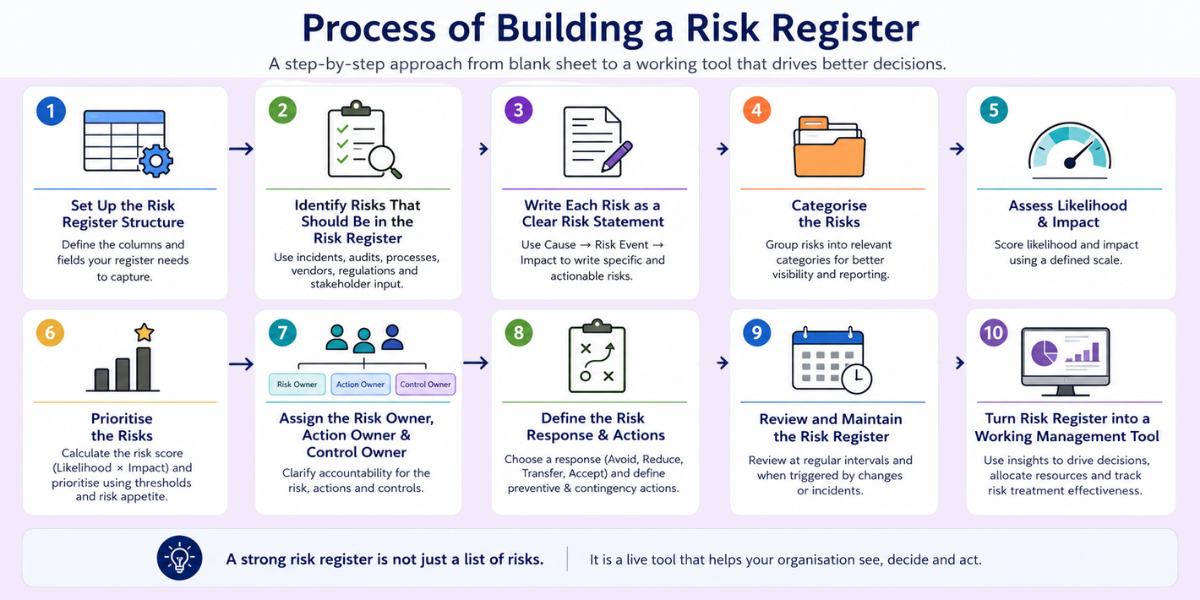
The following steps turn that principle into a practical build process.
1. Set Up the Risk Register Structure
Start by creating the structure before entering risks. A basic risk register should capture enough information to identify the risk, assess its priority, assign accountability, document the response, and track what happens next.
A practical starting structure is:
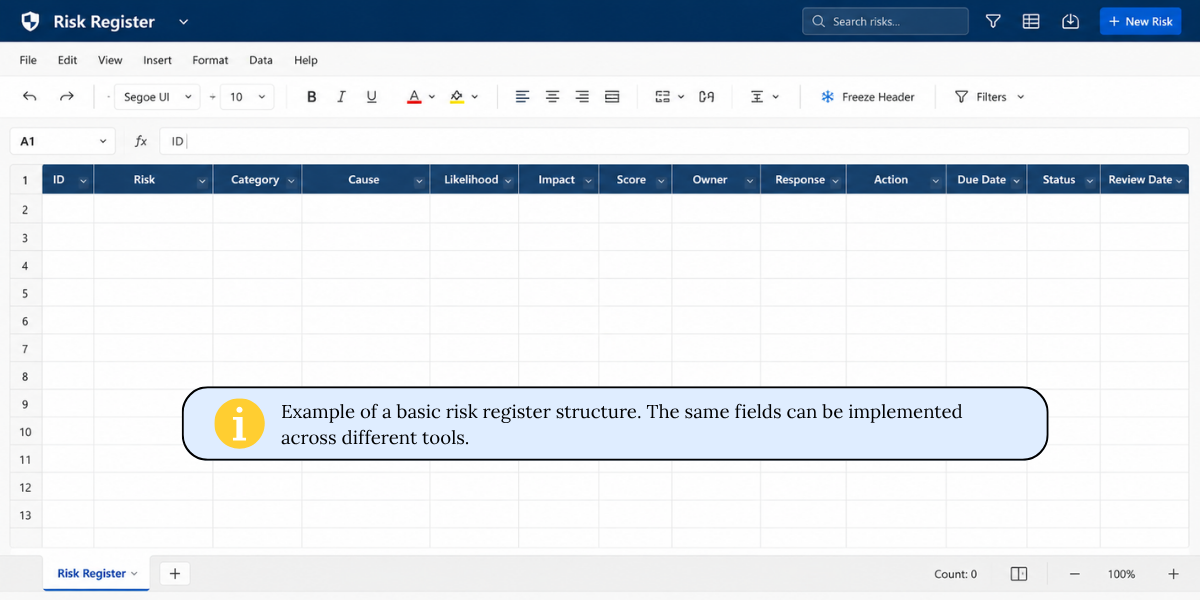
- Risk ID: Gives each risk a unique reference.
- Risk: States what could happen.
- Category: Groups similar risks for reporting and analysis.
- Cause: Explains what could trigger the risk.
- Likelihood: Estimates how probable the event is.
- Impact: Estimates the potential consequence.
- Score: Combines likelihood and impact using the chosen methodology.
- Owner: Establishes accountability for the risk.
- Response: Records the chosen treatment approach.
- Action: Defines what needs to happen next.
- Due Date: Creates a time-bound expectation.
- Status: Shows where the risk or treatment currently stands.
- Review Date: Establishes when the risk needs to be reassessed.
You can add fields such as inherent risk, residual risk, existing controls, action owner, control owner, risk appetite, and escalation status when the organisation needs them.
Do not add fields simply because another framework uses them.
Every column should have a job.
2. Identify Risks That Should Be in the Risk Register
Identify risks by looking at what could prevent your organisation, department, project, or process from achieving its objectives. Use evidence from existing business activity rather than relying only on a brainstorming session.
Where to Find Risks?
Start with:
- Previous incidents — What has already gone wrong?
- Audit findings — Which weaknesses have already been identified?
- Complaints — What problems are customers or stakeholders reporting?
- Process reviews — Where are the failure points?
- Contracts — What obligations could create exposure?
- Vendors — What happens if a critical supplier fails?
- Regulatory requirements — What obligations or changes could affect the organisation?
- Business plans — What could prevent strategic objectives from being achieved?
- Project plans — Which dependencies could disrupt delivery?
- Asset inventories — Which critical assets could be compromised or unavailable?
- Stakeholder interviews — What concerns do people closest to the work have?
- Previous risk registers — Which risks remain relevant?
- Lessons learned — What did previous projects or incidents teach you?
Then ask:
What could stop us from achieving this objective?
That question is often more useful than simply asking, "What risks do we have?"
3. Write Each Risk as a Clear Risk Statement
Write each risk as a specific scenario rather than a broad topic. A useful structure is Cause → Risk Event → Impact, because it explains what could happen, why it could happen, and what the consequence could be.
Consider:
-
Weak:
Vendor risk
-
Better:
A prolonged outage at a critical third-party payment provider could interrupt customer transactions, resulting in service disruption and financial losses.
The 2nd version gives the risk owner something actionable.
A risk register should describe a scenario that someone can actually assess and manage.
4. Categorise the Risks
Use a consistent set of categories to make risks easier to filter, report, assign, and analyse. Common categories include strategic, operational, financial, compliance/legal, technology, cybersecurity, people, third-party, and reputational risks.
Common Risk Categories
| Category | Example |
|---|---|
| Strategic | Failure to achieve a major business objective |
| Operational | Critical process disruption |
| Financial | Unexpected financial loss |
| Compliance/Legal | Failure to meet a regulatory obligation |
| Technology/Cybersecurity | System failure or cyber incident |
| People | Loss of critical skills |
| Third-party | Supplier or service-provider failure |
| Reputational | Loss of stakeholder confidence |
Why Does Consistent Categorisation Matter?
A consistent taxonomy helps teams:
- Filter risks by area.
- Assign risks to appropriate functions.
- Report risk concentrations to management.
- Identify gaps in risk coverage.
- Compare risks across departments.
But resist the urge to create 25 categories simply because your spreadsheet allows it.
Categories should make the register easier to use—not harder to maintain.
5. Assess Likelihood & Impact
Assess each risk using defined likelihood and impact criteria, then calculate the risk score according to your chosen methodology. A basic risk score can be calculated by multiplying likelihood by impact, provided both scales have been defined consistently. A simple five-point model can make prioritisation easier, but the organisation should define what each score means rather than treating numbers as universal.
Use a 1–5 Likelihood Scale
| Score | Likelihood |
|---|---|
| 1 | Rare |
| 2 | Unlikely |
| 3 | Possible |
| 4 | Likely |
| 5 | Almost certain |
Your organisation should establish its own criteria, such as frequency, historical evidence, probability ranges, or other appropriate measures.
Use a 1–5 Impact Scale
| Score | Impact |
|---|---|
| 1 | Minimal |
| 2 | Minor |
| 3 | Moderate |
| 4 | Major |
| 5 | Severe |
Depending on the organisation, impact may consider:
- Financial loss
- Operational disruption
- Regulatory consequences
- Customer impact
- Privacy impact
- Security impact
- Reputational damage
Calculate the Risk Score
A simple model is:
Likelihood × Impact = Risk Score
For example:
Likelihood = 4
Impact = 5
Risk Score = 20
6. Prioritise the Risks
Prioritise risks by comparing their scores against defined thresholds, risk appetite, and escalation criteria. A high score should trigger proportionately stronger management attention, while lower-scoring risks may be monitored or accepted depending on the organisation's risk criteria.
A simple framework might look like:
| Score | Priority | Typical response |
|---|---|---|
| 1–4 | Low | Monitor or accept |
| 5–9 | Moderate | Consider mitigation |
| 10–16 | High | Action and management attention |
| 17–25 | Critical | Immediate escalation/action |
These ranges are illustrative, not universal. Your organisation should define thresholds that reflect its risk appetite and operating context.
7. Assign the Risk Owner, Action Owner and Control Owner
Assign accountability explicitly instead of simply attaching a department name to a risk. A risk owner is accountable for managing the overall risk, while an action owner completes a specific mitigation action and a control owner maintains an existing control.
This distinction is particularly useful in larger organisations where responsibility for a risk and responsibility for individual actions may sit with different people.
Risk Owner vs Action Owner vs Control Owner
| Role | Responsibility |
|---|---|
| Risk Owner | Accountable for managing the overall risk |
| Action Owner | Responsible for completing a specific mitigation action |
| Control Owner | Responsible for maintaining an existing control |
Consider this example.
A critical supplier creates a third-party risk.
The Procurement Head may own the risk.
The IT Manager may own the action to implement a backup supplier.
The Vendor Management Lead may own the existing supplier-monitoring control.
Different responsibilities. One risk.
That distinction makes the register much more actionable.
8. Define the Risk Response & Actions
A risk response should explain what the organisation will do about the exposure. Select a risk response based on the nature of the risk and the organisation's tolerance. Common approaches include avoid, reduce/mitigate, transfer, or accept, with the selected response translated into specific actions, owners, and deadlines. The selected response should lead to specific actions with accountable owners and deadlines.
A. Avoid
Change the activity or decision so the risk no longer exists.
Example: Stop using a process that creates an unacceptable exposure.
B. Reduce or Mitigate
Introduce controls or actions that reduce the likelihood or impact.
Example: Add redundancy to reduce the effect of a system failure.
C. Transfer
Shift some of the financial or operational consequences to another party.
Example: Use contractual protections or insurance where appropriate.
D. Accept
Retain the risk because it falls within approved tolerance or because further treatment is disproportionate.
Acceptance should be a decision—not an excuse to do nothing.
9. Review and Maintain the Risk Register
A risk register should be reviewed according to the organisation's risk profile and updated when circumstances change. Establish both a regular review cycle and event-based triggers so that important changes are not left waiting for the next calendar review.
Maintain the risk register through a combination of scheduled reviews and event-based triggers. The review frequency should reflect the organisation's risk profile, while significant incidents, regulatory changes, business changes, or threshold breaches should trigger reassessment outside the normal review cycle.
Establish a Review Frequency
A practical starting point could be:
- Project risks: Weekly or fortnightly, depending on project complexity.
- Operational risks: Monthly or quarterly, depending on risk profile.
- Enterprise risks: According to the organisation's governance and risk profile.
These are starting points, not universal requirements.
A critical operational risk may require much more frequent monitoring than a low-level risk reviewed quarterly.
Define Events that Trigger Immediate Risk Review
Do not rely only on the calendar.
Review the risk register when:
- A new regulation affects the organisation.
- A major vendor changes.
- A significant incident occurs.
- Business strategy changes.
- New technology is introduced.
- A major contract is signed.
- The organisation restructures.
- A risk threshold is breached.
- A control fails or becomes ineffective.
Calendar reviews keep the register maintained. Trigger-based reviews keep it relevant.
Update the Risk Status
Useful status options include:
- Open
- Monitoring
- Treatment in progress
- Accepted
- Mitigated
- Closed
When a risk changes, update the register rather than creating another duplicate entry.
The objective is to maintain a reliable record of what changed, why it changed, who acted, and what risk remains.
10. Turn Risk Register into a Working Management Tool
A completed risk register becomes valuable when it influences decisions, resources, controls, and priorities. Use it in management reviews, project discussions, compliance activities, audit planning, and other decision-making processes instead of treating it as a document that is updated only before an audit.
What Does a Good Risk Register Look Like?
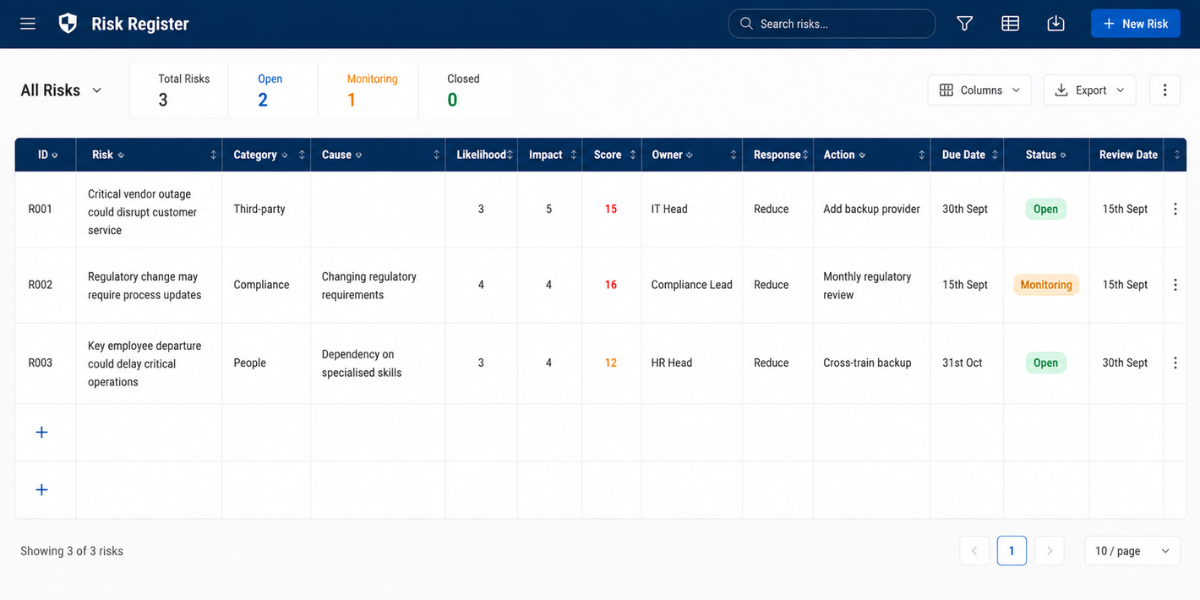
A good risk register connects each risk to a clear statement, category, likelihood, impact, risk score, owner, response, action, status, and review point. It should be detailed enough to support decisions but simple enough that risk owners can understand and update it without becoming dependent on a specialist administrator.
Example: Completed Risk Register
Conclusion
Learning how to build a risk register is not about creating the most complicated spreadsheet possible.
It is about creating a structured view of the risks that matter, deciding how those risks should be treated, assigning clear accountability, and making sure the information stays current.
Start with the simplest workable structure.
Define the scope. Choose the right tool. Build the columns. Identify the risks. Write them clearly. Score and prioritise them. Assign owners. Document risk mitigation. Then review the register whenever the risk environment changes.
A strong risk register ultimately becomes more than a list of risks.** It becomes a practical blueprint for deciding where the organisation needs to strengthen its defences, allocate resources, and act next.
Key Takeaways
- Define the scope: Decide what the risk register covers, who will use it, and who will maintain it.
- Choose the right tool: Select a tool that matches your organisation’s size, risk complexity, and reporting needs.
- Build the structure: Include fields for risks, causes, likelihood, impact, owners, actions, status, and review dates.
- Identify and describe risks: Use real business evidence and write risks clearly using cause → event → impact.
- Assess and prioritise risks: Score likelihood and impact consistently, then prioritise risks based on defined thresholds.
- Assign accountability: Clearly distinguish between the risk owner, action owner, and control owner.
- Define and track responses: Choose the right response, document mitigation actions, and assign deadlines.
- Keep it working: Review the register regularly and use it to support decisions, resource allocation, and risk management.
Related Blog