Table of contents
By-Research Team
April 21, 2026 | 9 min read | Cybersecurity
What is Role Based Access Control (RBAC)?
Data is everywhere. And frankly, it’s more exposed than most people realize.
From banking apps to workplace dashboards, data is constantly being accessed, shared, and sometimes… misused. The real problem isn’t just hacking—it’s who has access to what, and why.
Before diving into RBAC, it’s important to understand a few basic concepts that make everything easier to grasp.
Why Data Security Matters Today
Data security is the practice of protecting digital information from unauthorized access, misuse, or breaches. In today’s digital economy, data volumes are growing rapidly—global data is expected to reach around 163 zettabytes by 2025. Even a small exposure in such a vast data environment can lead to serious financial and reputational damage.
Source: IDC Data Age Report 2025
Think about it:
- Your UPI apps store transaction history
- Companies store employee and customer data
- Platforms track behaviour, preferences, and identity
Now ask yourself:
Should everyone inside a system have access to everything?
This is where the real problem begins.
What is Cybersecurity and How Does It Protect Data?
Cybersecurity is the practice of protecting systems, networks, and data from digital attacks, unauthorized access, and damage. It acts as a defensive shield, combining tools, policies, and controls to ensure that sensitive information remains secure.
Data security is the goal.
Cybersecurity is the system that makes that goal possible.
Think of it like this:
- Data security = What you want to protect
- Cybersecurity = How you protect it
Without cybersecurity, data protection is just a theory.
What Tools Are Used in Cybersecurity?
Cybersecurity uses multiple tools and mechanisms to protect data, systems, and user access. These tools work together like layers of a fortress, ensuring that even if one layer fails, others continue to protect the system.
Some key tools include:
- Firewalls → Control incoming and outgoing traffic
- Encryption → Protect data by converting it into unreadable formats
- Monitoring systems → Detect suspicious activity
- Access control mechanisms → Decide who gets access to what
Here’s the key insight:
Access control is not the entire system—it’s one of the most critical control layers inside cybersecurity.
What is Access Control in Cybersecurity?
Access control is a cybersecurity mechanism that determines who can access specific data, systems, or resources, and what actions they can perform. It ensures that only authorized users interact with sensitive information based on defined rules and permissions.
Let’s simplify this.
Imagine an office building:
- Not everyone can enter the server room
- Not every employee has access to financial records
That’s access control in action.
It works on two ideas:
- Authentication → Who are you?
- Authorization → What are you allowed to do?
Now, there are different ways to design this system.
Types of Access Control
Access control models define how permissions are assigned and enforced within a system. Each model uses a different logic to decide who gets access.
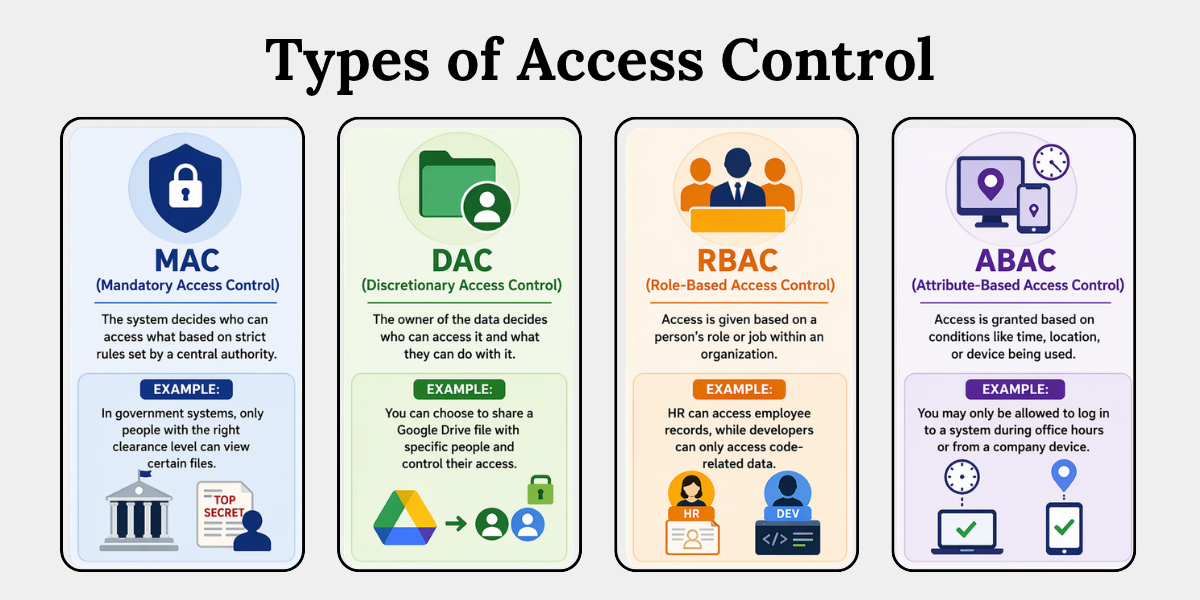 Here’s a simple breakdown:
1. MAC (Mandatory Access Control)
The system decides who can access what based on strict rules set by a central authority.
For example, in government systems, only people with the right clearance level can view certain files.
2. DAC (Discretionary Access Control)
The owner of the data decides who can access it and what they can do with it. For example, you can choose to share a Google Drive file with specific people and control their access.
3. RBAC (Role-Based Access Control)
Access is given based on a person’s role or job within an organization. For example, HR can access employee records, while developers can only access code-related data.
4. ABAC (Attribute-Based Access Control)
Access is granted based on conditions like time, location, or device being used. For example, you may only be allowed to log in to a system during office hours or from a company device.
For most organizations, RBAC is the most practical and widely used model.
Now, this is where the real discussion begins.
What is Role Based Access Control (RBAC)?
Role Based Access Control (RBAC) is a method of restricting system access based on a user’s role within an organization. Instead of assigning permissions individually, access is granted to roles, and users are assigned to those roles, ensuring structured and scalable access management.
In simple terms:
You don’t give access to people. You give access to roles.
Think of a company:
- HR → Access to employee data
- Finance → Access to billing and payroll
- Developer → Access to codebase
No overlap. No confusion.
That’s RBAC acting like a well-designed blueprint, not a chaotic permission system.
How Does RBAC Work?
RBAC works by linking three key components: users, roles, and permissions. Permissions are assigned to roles, and users inherit those permissions through their assigned roles, ensuring controlled and consistent access management.
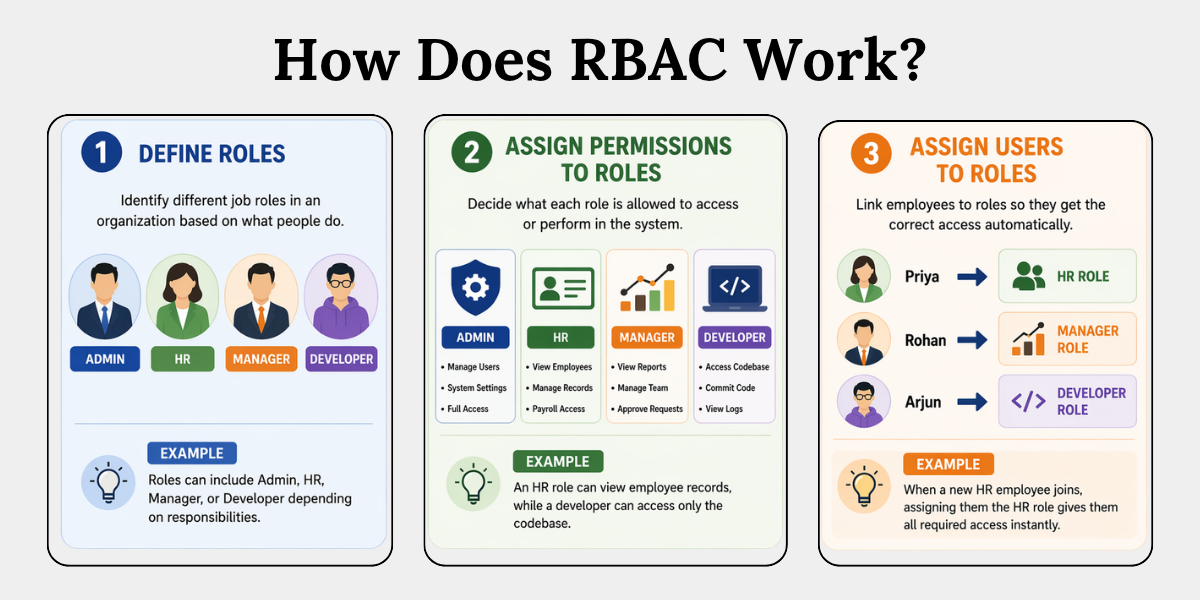
Let’s break it down step-by-step:
1. Define Roles
This step means identifying different job roles in an organization based on what people do.
For example, roles can include Admin, HR, Manager, or Developer depending on responsibilities.
2. Assign Permissions
This step means deciding what each role is allowed to access or perform in the system.
For example, an HR role can view employee records, while a developer can access only the codebase.
3. Assign Users
This step means linking employees to roles, so they get the correct access automatically.
For example, when a new HR employee joins, assigning them the HR role gives them all required access instantly.
Here’s a quick example:
A new employee joins the HR team.
Instead of manually giving access to each system, you assign them the “HR Role.”
This role is already set up with permissions—like access to employee records, payroll systems, and internal HR tools.
As soon as the role is assigned, the employee automatically gets all the required access—nothing more, nothing less.
No need to configure access one by one. No risk of giving unnecessary permissions.
That’s efficiency + security combined.
How to Implement RBAC
Implementing RBAC involves defining roles, assigning permissions, and mapping users systematically to ensure controlled access. Even for non- technical environments, a structured approach can significantly reduce security risks and improve data governance.
Here’s a simplified roadmap:
1. Identify Key Roles
This step means identifying the main job roles in your organization based on what people do.
For example, common roles can include Admin, HR, Finance, and IT based on their responsibilities.
2. Define Access Needs
This step means deciding what each role actually needs access to in order to do their job properly.
For example, the Finance team may need access to billing systems, but not employee personal records.
3. Apply Least Privilege Principle
This step means giving only the minimum access required to complete tasks— nothing extra.
For example, an employee may only be allowed to view data but not edit or delete it.
4. Assign and Review
This step means assigning users to roles and regularly checking if their access is still appropriate.
For example, if someone changes departments, their old access should be removed and updated.
Don’t overcomplicate it.
Start small. Expand gradually.
RBAC Best Practices
RBAC is most effective when implemented with structured governance, periodic reviews, and alignment with security principles like least privilege. Organizations that follow best practices reduce insider threats by up to 80%, according to cybersecurity studies.
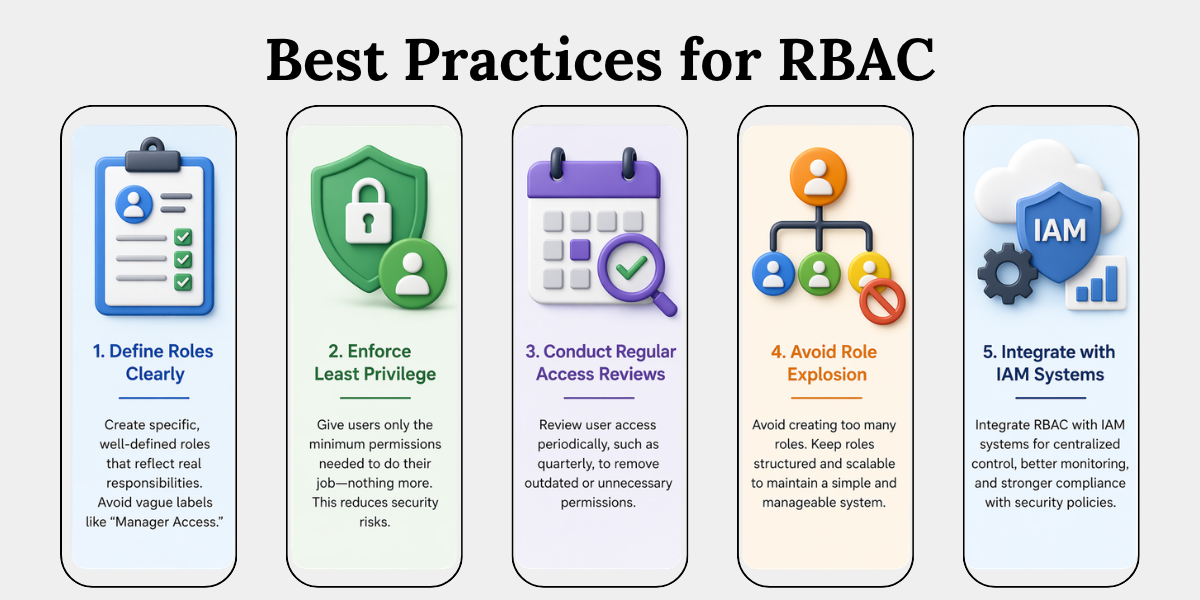
1. Define Roles Clearly
Organizations should define roles with clarity and precision, avoiding vague labels such as “Manager Access.” Each role must reflect specific responsibilities—for example, an HR Manager and a Finance Manager should have distinct access rights. Clearly defined roles help prevent permission overlap, which is a common but often unnoticed security risk.
2. Enforce Least Privilege
Access should always be granted based on the least privilege principle, meaning users receive only the permissions necessary to perform their tasks. Although this may seem straightforward, many security incidents occur because users are given excessive access beyond their actual requirements.
3. Conduct Regular Reviews
Access permissions should not remain static over time. As employees change roles or responsibilities, their access needs also evolve. Regular reviews—such as quarterly audits—help ensure that users do not retain outdated or unnecessary permissions.
4. Avoid Role Explosion
Organizations should avoid creating an excessive number of roles, as this can make access management complex and difficult to maintain. If every individual has a separate role, the system loses its structure. A well-designed RBAC system should remain organized, scalable, and easy to manage.
5. Integrate with IAM
RBAC is most effective when implemented alongside Identity and Access Management (IAM) systems. This integration enables centralized control over user access, improves monitoring capabilities, and supports compliance with security and data protection requirements.
Conclusion
Most organizations think security is about stopping hackers.It’s not. It’s about controlling access from within.
RBAC is not just a technical model—it’s a security mindset:
- Structured
- Predictable
- Scalable
So, the real question is: Are you managing access… or just assuming it’s under control?
Because in cybersecurity, assumptions are the weakest link.
Key Takeaways
- Data security is important because growing data increases risk.
- Cybersecurity protects data using systems and controls.
- Access control decides who can access what.
- RBAC gives access based on roles, not individuals.
- Users get permissions automatically through roles.
- RBAC makes access management simple and secure.
- It can be implemented by defining roles and reviewing access.
- Best practices like least privilege improve security.
Related Blog